
Known Issue: D2L Assessment Dates and Browser Compatibility
Due to browser timezone issues related to Alberta’s transition to permanent Mountain Daylight Time (Alberta Time), D2L Dropbox, Quizzes and Discussions due/end dates may appear one hour different depending on the browser being used (e.g., Chrome or Firefox), particularly for dates after November 1. Dates set near midnight may also display as the following calendar day.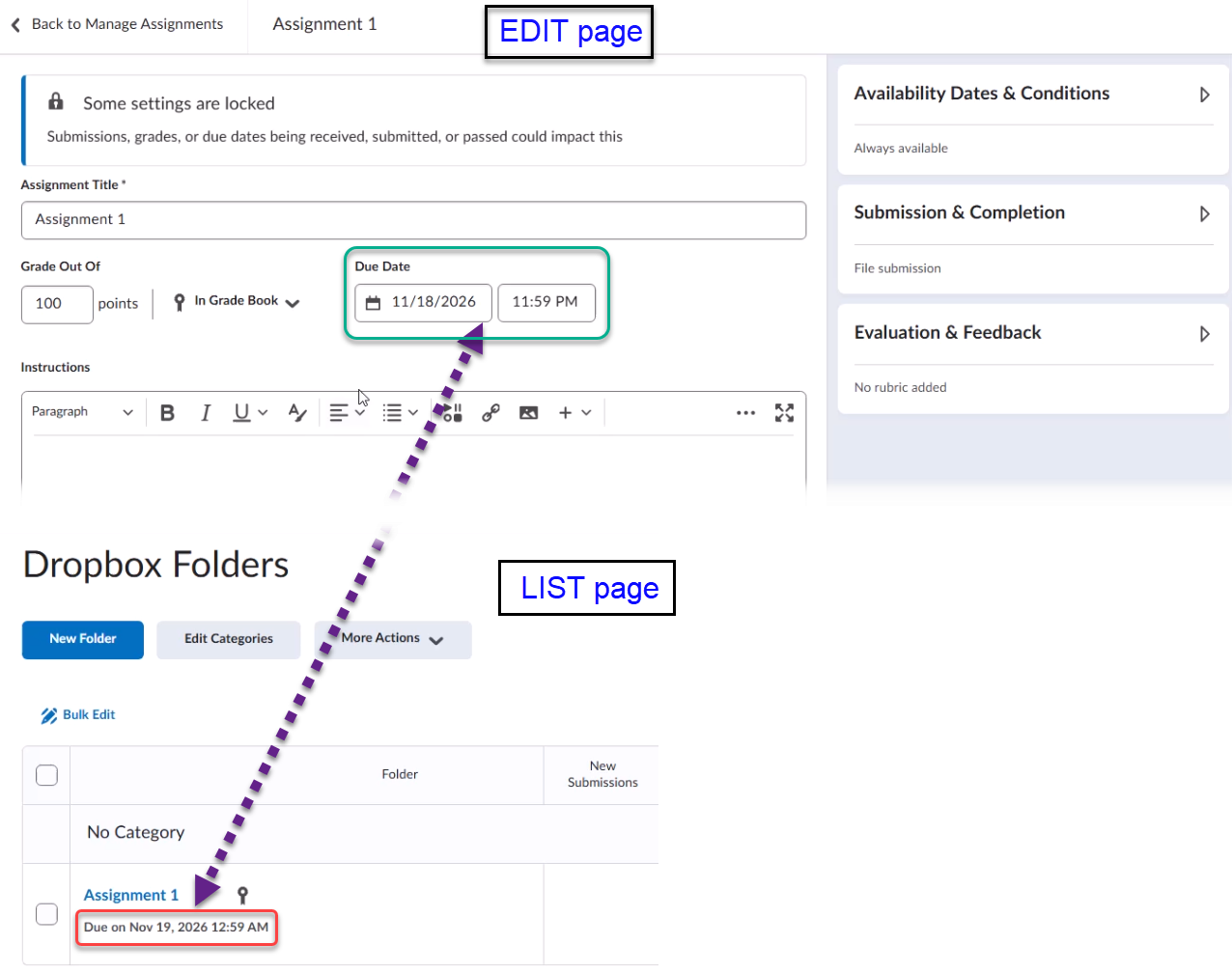
Good news: Chrome version 154 appears to have resolved this issue, and UCalgary-managed computers should already have this update installed.
For newly created assessments, Chrome 154 should now display and save the correct times.
IMPORTANT: If you have assessments scheduled after November 1, we recommend reviewing their dates and times, particularly for high-stakes assessments. Please note that updating Chrome will not automatically correct assessments that were previously saved with an incorrect time, so existing assessments should still be reviewed and updated if necessary.
When reviewing an assessment, the time shown on the quiz, dropbox assignment, or discussion list page should be treated as the source of truth. That value reflects the time stored by D2L. The time shown on the edit page may previously have differed from the list page time because the browser was applying outdated time-zone information.